
Markdown Converter
Markdown is the plain-text format used by GitHub, many note apps, documentation sites and chat tools. Getting existing content into Markdown is often the hard part. This converter turns HTML or formatted text you paste into tidy Markdown, turns spreadsheet data into a Markdown table, and can also go the other way — stripping Markdown to plain text for places that don’t support it.
- Free to use
- No sign-up
- Runs in your browser
Markdown converter
Release notes
Version 2.4 adds new docs and fixes:
- Faster
search - Better dark mode
| Plan | Price |
|---|---|
| Basic | $5 |
| Pro | $12 |
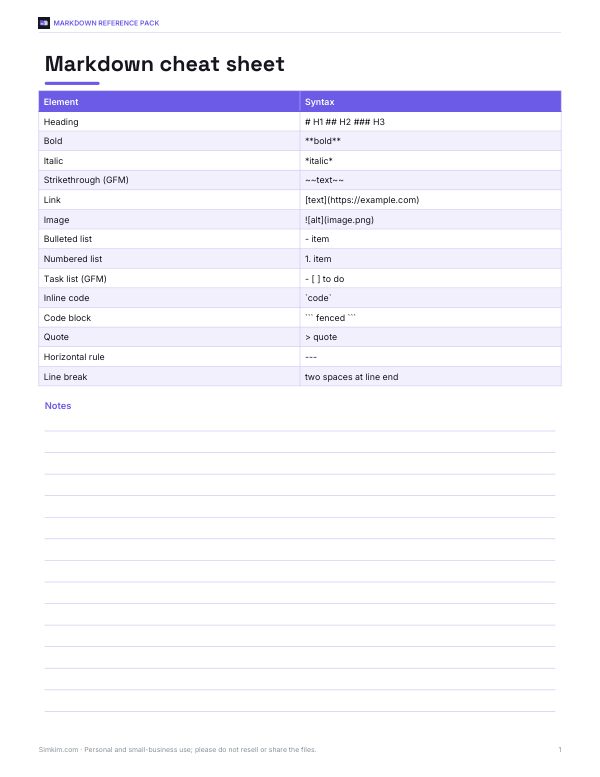
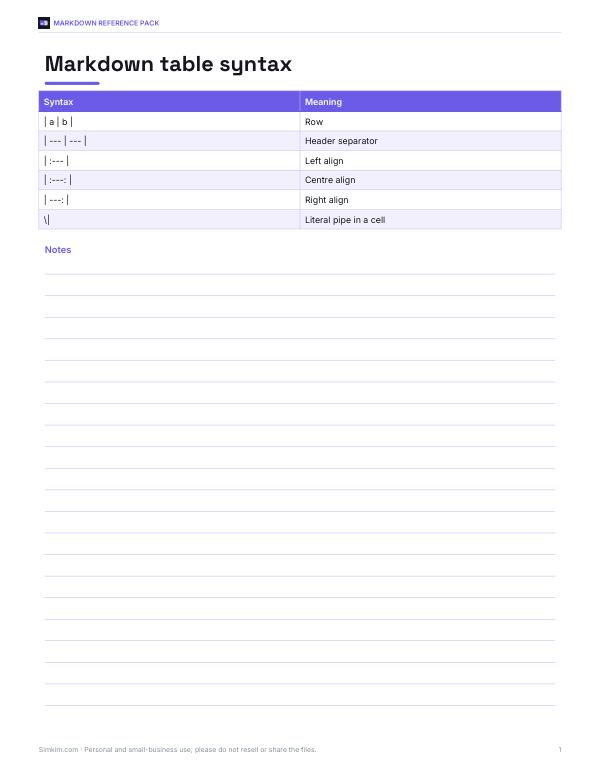
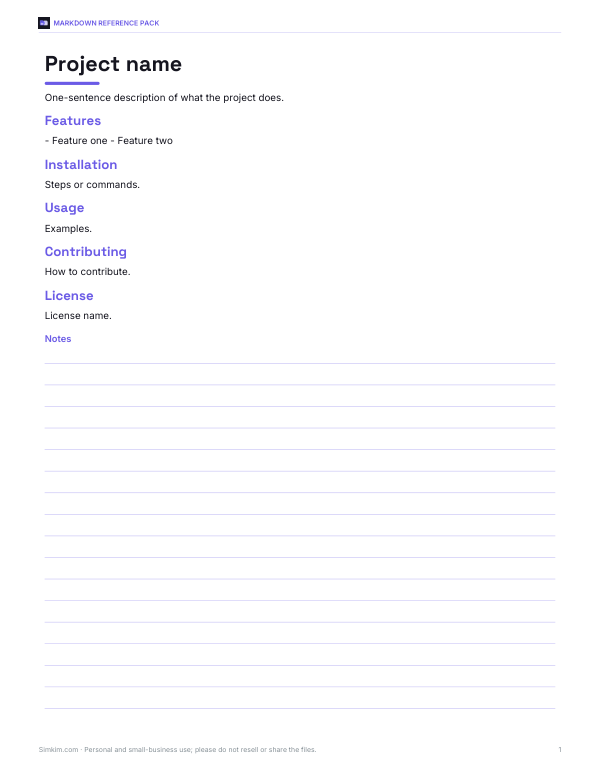
Markdown Reference Pack
Printable Markdown cheat sheet (CommonMark and GFM), a table syntax card, a README template and a documentation style checklist.
- Cheat sheet (PDF)
- Table card (PDF)
- README template (DOCX/PDF)
- Docs checklist (PDF/DOCX)
Formats: PDF, DOCX. Instant download after payment (link valid 72 hours, up to 5 downloads). AI-assisted: the templates were drafted with AI help and reviewed and laid out before publishing.
$5.00 USD, one-time 4 files · about $1.25 each
- Instant download
- 7-day refund
- Secure checkout by Stripe
7-day money-back guarantee. Full refund within 7 days of purchase, even after you download.
Free sample: Docs Style Checklist (PDF, 57 KB)
Full refund within 7 days — see the refund policy and license.
Free printables
Single sheets you can print right now, no sign-up. The full pack adds every sheet in one download plus the editable files.
 Documentation Style Checklist Printable
Three conversions
| Mode | Input | Typical use |
|---|---|---|
| HTML / rich text → Markdown | Copy from a web page, Google Docs, Word or email and paste into the box | Moving content into GitHub, a wiki, Obsidian, Notion import or a static site |
| CSV / spreadsheet → Markdown table | CSV text, or cells copied straight from Excel or Google Sheets | Tables in README files, docs and issues |
| Markdown → plain text | Markdown source | Pasting into places without Markdown support, such as SMS or some forms |
What converts
| Formatting | Markdown |
|---|---|
| Headings | # H1, ## H2 … |
| Bold / italic | **bold**, *italic* |
| Links | [text](url) |
| Images |  |
| Bulleted and numbered lists | - item, 1. item (nested lists indented) |
| Inline code / code blocks | `code`, fenced ``` blocks |
| Block quotes | > quote |
| Tables | GitHub-style pipe tables |
| Strikethrough | ~~text~~ (GitHub Flavored Markdown) |
Colours, fonts and complex layouts have no Markdown equivalent and are dropped. Merged table cells can’t be represented in pipe tables, so check tables with merged cells after converting.
Worked example
A product team copies release notes from a web page: a heading, a paragraph with bold text and a link, a two-item bulleted list and a small pricing table. Pasted into the converter, it becomes “## Release notes”, “Version **2.4** adds [new docs](https://example.com/docs) and fixes:”, two “- ” bullets with inline code and italics preserved, and a three-row pipe table. Pasted into a GitHub pull request, it renders the same as the original.
Markdown tables from spreadsheets
Select cells in Excel or Google Sheets, copy and paste them into the CSV box: tabs between cells are detected automatically. The first row becomes the header. Columns containing only numbers are right-aligned with :--- markers, which GitHub and most renderers respect. Pipe characters inside cells are escaped so they don’t break the table.
Markdown flavours
Basic Markdown (from 2004) covers headings, emphasis, lists, links, images, code and quotes. CommonMark is a precise specification that most modern tools follow. GitHub Flavored Markdown (GFM) adds tables, strikethrough, task lists and automatic links. The output here uses CommonMark plus GFM tables and strikethrough, which work on GitHub, GitLab, many documentation generators and note-taking apps.
Where Markdown is used
| Place | Notes |
|---|---|
| GitHub and GitLab | README files, issues, pull requests and wikis use GitHub Flavored Markdown |
| Documentation sites | Static site generators and docs tools build pages from Markdown files |
| Note-taking apps | Many store notes as Markdown files you own |
| Chat and forums | Many support a subset: bold, italics, code and links |
| Writing and publishing | Some blogging platforms and newsletter tools accept Markdown |
| Data science notebooks | Text cells in notebooks are Markdown |
Because Markdown is plain text, it works well with version control: every change is visible as a line of text, and files stay readable even without special software.
Converting whole documents
- Open the document in its original app and select everything.
- Copy and paste into the HTML box — keep the formatting.
- Check headings: if they came through as bold paragraphs, the source didn’t use heading styles; add # marks by hand.
- Check tables and nested lists.
- Download the .md file and commit it or import it into your tool.
- For many files, a desktop converter such as Pandoc can batch-convert documents.
Escaping special characters
Some characters have meaning in Markdown: asterisks and underscores make emphasis, backticks make code, square brackets make links and pipes separate table cells. When those characters appear in ordinary text — a price like 5*3, a file name like my_file_name — the converter puts a backslash in front of them so they display literally. If you see stray backslashes in the output, that is why; most renderers hide them.
Headings and document structure
Good Markdown uses one level-1 heading for the title and then level-2 and level-3 headings in order, without skipping levels. Screen readers, table-of-contents generators and documentation sites rely on this structure. If your source document used large bold text instead of real headings, the converter can’t tell them apart from ordinary bold text — add the # marks afterwards.
Plain-text output
The Markdown to plain text mode removes heading marks, emphasis, code fences and table pipes, keeps list items as bullet characters, and writes links as “text (url)” so the address isn’t lost. It is useful for pasting release notes into places that show Markdown symbols literally, such as some messaging apps, forms and SMS.
Tips for clean conversions
- Paste using the normal paste command so formatting comes through; “paste as plain text” loses it.
- Headings only convert if the source used real heading styles, not just large bold text.
- Review links copied from documents — some apps wrap them in tracking redirects.
- Special characters such as * and _ in ordinary text are escaped with a backslash so they don’t turn into formatting.
- Very long documents convert fine, but check tables and nested lists afterwards.
Privacy
Everything is converted in your browser. Pasted content isn’t uploaded or stored, and scripts in pasted HTML are removed before conversion.
Frequently asked questions
How do I convert HTML to Markdown?
Paste the HTML or formatted text into the box in HTML mode; the Markdown appears instantly.
Can I convert an Excel table to Markdown?
Yes — copy the cells and paste them in CSV mode.
Does it support GitHub Flavored Markdown?
Yes, tables and strikethrough use GFM syntax.
How do I remove Markdown formatting?
Use Markdown → plain text mode.
What happens to colours and fonts?
They are dropped, because Markdown has no way to express them.
Is my content uploaded?
No. Conversion happens in your browser.
Does it convert Word documents?
Yes — copy from Word and paste; headings, lists, bold, links and tables come through.
Can I convert Markdown to HTML here?
This tool focuses on getting content into Markdown and back to plain text.